AI-generated entry. See What & Why for context.
Point your Coding CLI to this blog post
Today I was working on MUFFLER, and my Codex spent way too long trying to make this work, so I punished it by making it write a blog post.
The version that finally worked was:
- the extension opens the auth window
- Supabase generates the Google OAuth URL
- a tiny website page relays the result back to the extension
- the extension finishes with
exchangeCodeForSession(code)
The key idea is to keep each layer responsible for one thing:
- Chrome handles the popup and the
chromiumapp.orgcallback - Supabase handles Google OAuth, PKCE, and session creation
- the website is just the last redirect hop
Once I stopped treating the website as the source of truth for extension auth, everything got simpler.
The flow
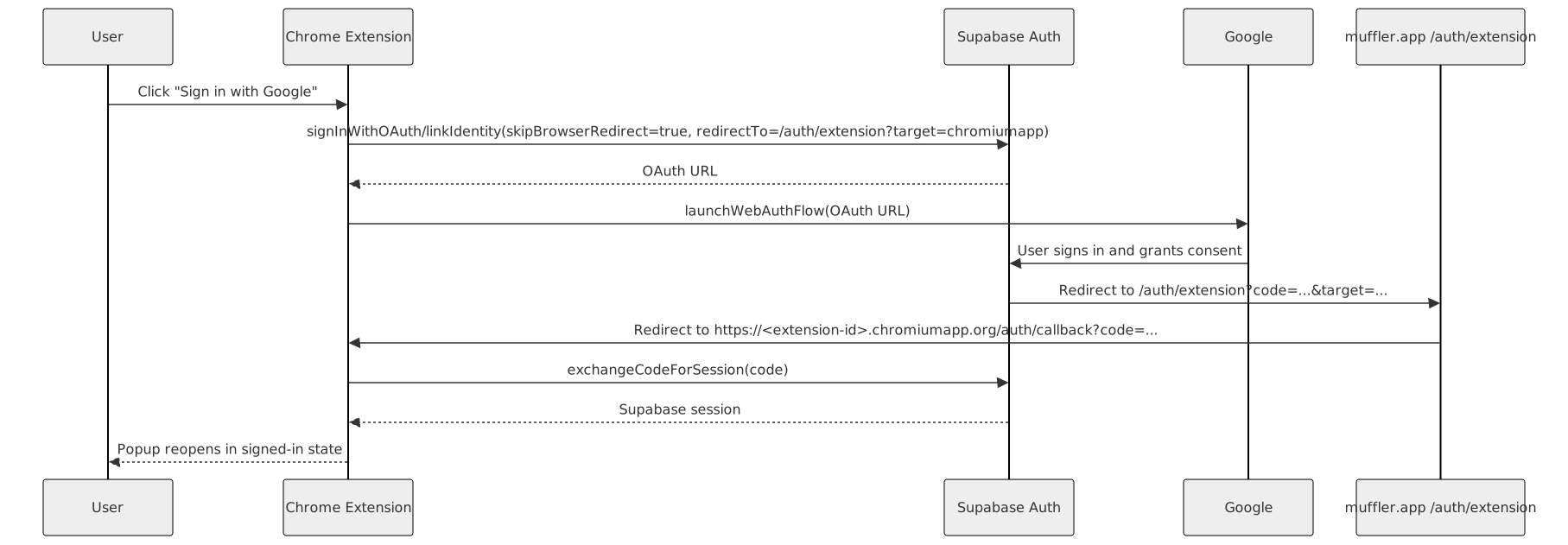
- The extension calls
signInWithOAuth(... skipBrowserRedirect: true ...)orlinkIdentity(...). - Supabase returns an OAuth URL instead of redirecting the current page.
- The extension opens that URL with
chrome.identity.launchWebAuthFlow(). - Google signs the user in through Supabase’s hosted OAuth flow.
- Supabase redirects to
/auth/extension?code=...&target=.... - That relay page validates the target and forwards the result to
https://<extension-id>.chromiumapp.org/auth/callback. - The extension reads the
codeand callssupabase.auth.exchangeCodeForSession(code).
Chrome’s identity API is what makes this shape work: it gives you a redirect URL under https://<app-id>.chromiumapp.org/*, and launchWebAuthFlow() resolves when the provider returns there.
Sequence diagram: extension Google sign-in
Why this shape is less brittle
The common failure mode is mixing responsibilities:
- hand-building Google authorize URLs
- parsing Google tokens yourself
- calling
setSession(...)manually in the extension - or trying to bounce through the website and hope extension auth updates itself
That creates two problems at once: too much OAuth code in the extension, and two competing session stores.
Supabase already knows how to run the provider flow and handle PKCE. Chrome already knows how to manage an extension auth window. If you let each piece do its job, there is much less state to reconcile.
The setup details that mattered
1. Keep the extension ID stable
If your relay page or allowlist depends on a specific chromiumapp.org origin, the extension ID needs to stay fixed between builds.
Chrome documents the supported way to do that: upload the extension to the Chrome Web Store dashboard, copy the public key, and set it in "key" inside manifest.json.
That makes the redirect predictable:
https://<extension-id>.chromiumapp.org/auth/callback2. For Supabase’s Google provider flow, use a Google Web application client
This was the biggest conceptual correction for me.
Supabase’s Google auth docs say to create a Google OAuth client of type Web application, add your app origin under Authorized JavaScript origins, and register your Supabase callback URI as the redirect URI.
So in this setup, Google is redirecting to Supabase, not directly to the extension. The extension callback only appears later, after your relay page forwards the result back into launchWebAuthFlow().
Google does have a Chrome Extension client type, but that is for a different architecture where the extension talks to Google directly. It is not the client Supabase’s hosted Google provider flow asks you to configure.
If you want to upgrade an existing anonymous user, enable manual identity linking in Supabase and use linkIdentity(...). Otherwise, use signInWithOAuth(...).
3. Let Supabase return the URL, then let Chrome open it
The core extension code ended up being straightforward:
const redirectTo = new URL("/auth/extension", siteUrl);
redirectTo.searchParams.set(
  "target",
  browser.identity.getRedirectURL("auth/callback")
);

const startResult = existingSession
  ? await supabase.auth.linkIdentity({
      provider: "google",
      options: {
        skipBrowserRedirect: true,
        redirectTo: redirectTo.toString(),
        queryParams: { prompt: "select_account" },
      },
    })
  : await supabase.auth.signInWithOAuth({
      provider: "google",
      options: {
        skipBrowserRedirect: true,
        redirectTo: redirectTo.toString(),
        queryParams: { prompt: "select_account" },
      },
    });

const callbackUrl = await browser.identity.launchWebAuthFlow({
  url: startResult.data.url!,
  interactive: true,
});

const { code } = parseGoogleOAuthCallback(callbackUrl);
await supabase.auth.exchangeCodeForSession(code);
skipBrowserRedirect: true matters because it keeps Supabase from redirecting the current context. Instead, you get a URL back, and the extension can open it in its own auth window.
4. Use a relay page, but keep it dumb
The relay page should do one job: validate the extension callback target and forward code or error.
const targetUrl = new URL(target);

if (!ALLOWED_EXTENSION_REDIRECT_ORIGINS.has(targetUrl.origin)) {
  throw new Error("Unsupported extension callback target.");
}

if (code) {
  targetUrl.searchParams.set("code", code);
} else if (error) {
  targetUrl.searchParams.set("error", error);
}

window.location.replace(targetUrl.toString());
Why a relay page at all? Because Supabase wants to redirect to an allowed application URL, while launchWebAuthFlow() wants the flow to finish on the extension’s chromiumapp.org URL. The relay page is the bridge between those two worlds.
It should not create a website session. It should not be an open redirect. It is just the last hop.
5. Treat anonymous upgrade as a separate path
If the extension already has an anonymous session, use linkIdentity(...) to attach Google to that user. If it does not, use signInWithOAuth(...).
That distinction matters because the user story is different:
signInWithOAuth(...)creates or signs into a permanent accountlinkIdentity(...)upgrades the current signed-in user
One practical lesson here: do not auto-create an anonymous user the moment the popup opens if you want a clean Google-first path. Otherwise every Google tap turns into an attach flow whether the user meant that or not.
Website continuity is a different problem
Getting Google sign-in working in the extension does not mean the website is now signed in too. Those are separate session stores.
If you want continuity on the website, solve it explicitly and one-way:
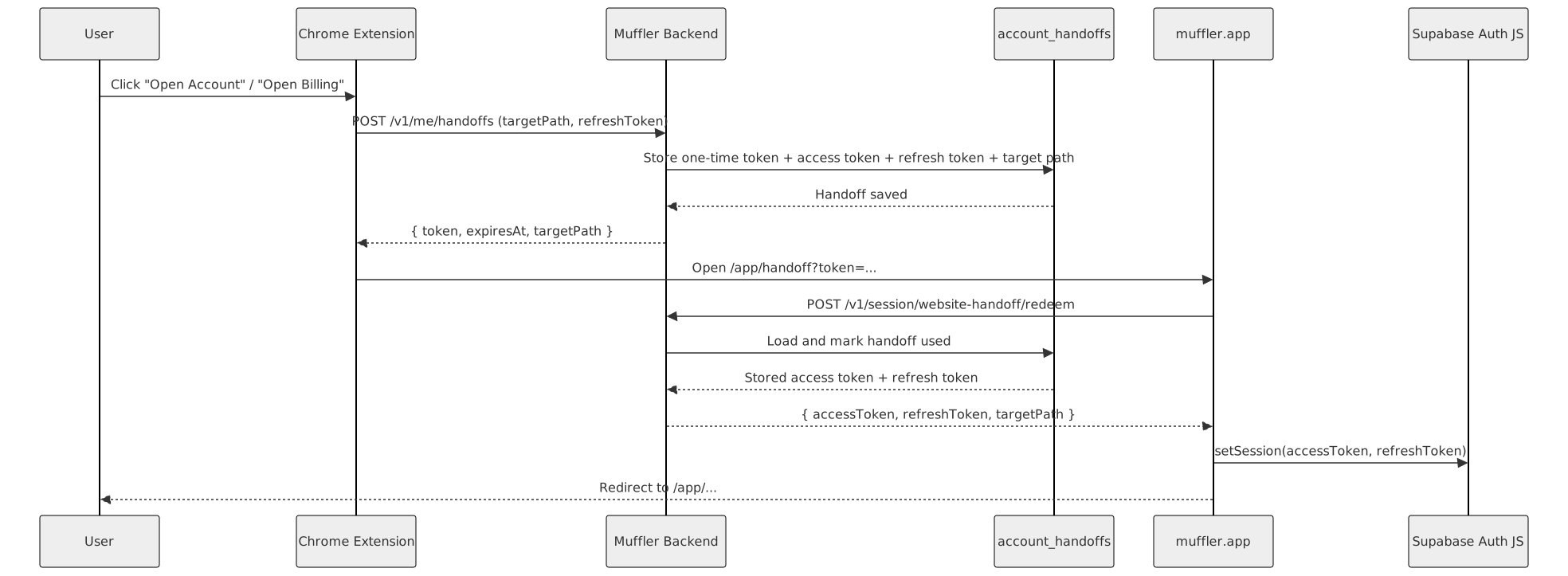
- The extension creates a short-lived, single-use handoff token.
- The website redeems it.
- The website restores its own Supabase session locally.
In Muffler, that is a POST /v1/me/handoffs followed by POST /v1/session/website-handoff/redeem, and then the website calls supabase.auth.setSession(...).
The important part is not the exact endpoint design. The important part is the direction of truth: extension auth stays extension-owned, and the website only inherits that state when the extension asks it to.
Sequence diagram: extension -> website handoff
The short version
If you are using Supabase Auth in a Chrome extension, the least painful setup I found is:
- let Supabase build the Google OAuth URL
- let the extension open it with
launchWebAuthFlow() - use a tiny website relay page to forward the result back to
chromiumapp.org - let the extension finish with
exchangeCodeForSession(code)
The “why” is simple: Chrome is good at extension auth windows, Supabase is good at OAuth and PKCE, and your website should not be doing either job unless it has to.