Teaching Codex to test a voice-first calendar
AI-generated entry. See What & Why for context.
I have been working on version 2.0 of KIN, a voice-first shared family calendar.
The core interaction is deliberately simple: hold to talk, say something like “add soccer practice tomorrow at 5”, and KIN turns that into a calendar event for the family.
That is a nice interaction for humans.
It is an annoying interaction for tests.
Normal UI automation is good at tapping buttons and typing text. It is much worse at pretending to be a person who presses and holds a microphone button, speaks into the iOS Simulator, waits for transcription, waits for an AI-backed calendar operation, and then verifies that the right event was actually created.
The version that finally worked combined a few pieces:
- Codex writes and operates the harness
- FlowDeck builds, runs, tests, and reads simulator logs
- Loopback turns generated audio into simulator microphone input
- XCUITest controls the exact hold-to-talk timing
- the local backend handles the real transcription and calendar inference path
Once those pieces were in place, I could run a local end-to-end test that creates a real event in KIN by injecting audio into the iOS Simulator.
The problem
KIN is not a form with a microphone icon attached to it.
The voice path is the product path:
- The user long-presses the voice bar.
- The app starts recording.
- The audio goes through transcription.
- The transcript goes to the calendar AI backend.
- The backend mutates calendar state.
- The app shows the result.
If I mock the transcript, I am not testing the microphone path.
If I mock the backend, I am not testing the calendar agent.
If I only test the backend, I am not testing whether the iOS app actually records and sends audio correctly.
What I wanted was a local test that exercised the same path a user does, without requiring me to sit there and repeat the same sentence into my laptop ten times.
Why this moved out of Maestro
I still use Maestro for ordinary UI smoke flows. It is good for that.
Voice input has one awkward constraint, though: the press duration matters.
KIN starts recording while the user holds the voice bar and stops when the press ends. If the utterance is three seconds long, the test needs to hold for a little more than three seconds. If the utterance is six seconds long, the test needs a different hold duration.
For this particular job, Maestro’s long press was too fixed.
XCUITest gives me the one API I needed:
press(forDuration:)That one call is why the voice tests moved into XCUITest. The test can hold the real voice_assistant_bar for exactly as long as the audio fixture needs.
The audio trick
The key was to stop treating the simulator as a magical testing object and start treating it as another Mac app with an audio input menu.
Loopback creates a virtual audio device on macOS. I created a device named Loopback Audio with a pass-through source. Then the runner does two things:
- sets macOS output to
Loopback Audio - sets macOS input to
Loopback Audio
Now anything I play from the Mac can also appear as microphone input.
The simulator still has to use that microphone. FlowDeck opens Simulator, and an AppleScript helper selects the same device from:
Simulator -> I/O -> Audio Input -> Loopback AudioAt that point, the path is:
/usr/bin/afplay -> macOS output -> Loopback Audio -> Simulator mic -> KINFor generated tests, the audio file starts as text:
/usr/bin/say -o utterance.aiff -- "Add loopback single amber river tomorrow at 3 PM."That part is surprisingly easy. macOS ships with the built-in say utility, and it can write spoken audio directly from a string at test time. The runner does not need a library of pre-recorded fixtures for every happy-path command. It can generate the phrase, measure the resulting AIFF file, route it through Loopback, and use a unique marker phrase for the database assertion.
For more realistic tests later, the same harness can use a recorded fixture:
KIN_VOICE_AUDIO_FIXTURE=/absolute/path/to/sample.wavThe app does not know the difference. From KIN’s point of view, someone spoke into the microphone.
The local path
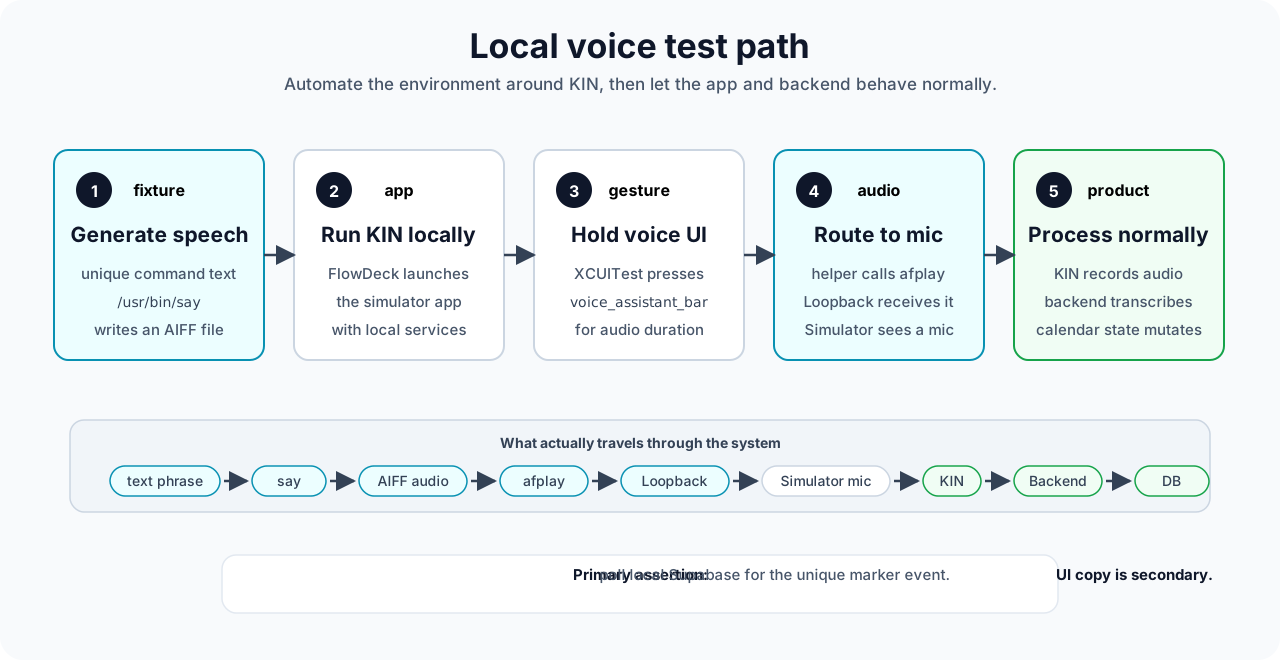
Timing the long press
This is the part that made the test feel real instead of lucky.
The runner measures the audio duration:
/usr/bin/afinfo utterance.aiffThen it computes:
holdDuration = audioDuration + 1.25 secondsThe extra time gives the app room to start recording and finish ingesting the last bit of audio.
The XCUITest does not play audio itself. Instead, the runner starts a tiny local helper server with three endpoints:
/health/config/play
XCUITest loads /config, presses the voice bar, calls /play, and keeps holding until holdDuration has elapsed.
The helper waits briefly before playing audio:
playbackDelay = 0.45 secondsThat delay matters. It means recording has already started before afplay begins sending the fixture through Loopback.
The rough shape is:
Runner      -> FlowDeck: run app with --local-backend
Runner      -> Helper: start /health /config /play
Runner      -> FlowDeck: run only the voice XCUITest
XCUITest    -> KIN: press voice_assistant_bar
XCUITest    -> Helper: GET /play?delay=0.45
Helper      -> Loopback: afplay utterance.aiff
Loopback    -> Simulator: virtual microphone input
Simulator   -> KIN: recorded audio
KIN         -> Backend: transcribe + calendar inference
Backend     -> KIN: acknowledgement + mutation
Runner      -> Backend: assert local database state
What Codex actually did
The interesting part was not that Codex wrote a test file.
The interesting part was that Codex could operate the whole loop:
- inspect the iOS code and find the hold-to-talk view
- add a stable accessibility identifier
- build a local runner under
test-support/loopback-voice - run the local Supabase, Langfuse, and AI backend stack
- launch the app in the simulator through FlowDeck
- read app logs to capture the anonymous local user id
- seed a local family row outside the app
- generate audio with
say - route audio through Loopback
- run XCUITest
- assert that the database changed in the expected way
- rerun the full suite until the timing was stable
- document the workflow for the next session
This is where agentic coding starts to feel qualitatively different from code completion.
The work was not one isolated patch. It was a loop across app code, test code, simulator state, local services, logs, and the database.
Why the backend assertion matters
For voice and LLM flows, UI text is a weak primary assertion.
The app might say:
Added.Or it might say:
I added that to your calendar.Both are fine.
But if the test utterance contains a unique marker phrase, the database gives a cleaner answer.
For example:
Add loopback single amber river willow tomorrow at 3 PM.The runner snapshots local calendar state before the test. After the voice flow, it polls local Supabase and checks that a new event containing this marker exists for the test family:
loopback single amber river willowThat became the split:
- DB and backend assertions are primary
- UI acknowledgements are secondary
This also made multi-event tests possible. One scenario says:
Add a dentist appointment tomorrow at 2 PM and soccer practice tomorrow at 5 PM.The test does not need the UI to phrase the response in a specific way. It checks that the local backend created both events.
The first five scenarios
The first committed suite covers the paths I care about most:
- Create one event by voice.
- Create multiple events in one utterance.
- Create a recurring event.
- Ask a non-mutating calendar question.
- Inject silence and verify no mutation.
The last two are important.
A voice assistant should not only do the right thing when the user gives a clean command. It should also avoid doing the wrong thing when the input is a question, silence, or garbage.
Why this stays local for now
This is intentionally not a CI test right now.
The harness depends on:
- a Mac
- an iOS Simulator
- Loopback
- Simulator audio input menu automation
- the full local backend
- real audio playback
That is exactly the kind of test I want locally before shipping voice changes, but not something I want to debug on a generic hosted runner.
The root command is:
pnpm test:e2e:ios:v2:voice:localIt leaves the normal Maestro smoke flows alone. That matters because not every UI test needs to pay the cost of audio routing and local AI inference.
What changed in my mental model
Before this, I thought of voice UI testing as either mocked or manual.
Now I think there is a useful third option:
Automate the environment around the app, then let the app behave normally.
Loopback handles the microphone problem.
FlowDeck handles the simulator problem.
XCUITest handles the exact gesture timing.
Codex handles the tedious glue across all of it.
That combination is what made the test practical.
It is still local. It is still a little mechanical. It still depends on the machine being configured correctly.
But it proves the important thing: KIN can create a real calendar event from audio injected into the simulator.
For a voice-first product, that is the test I actually wanted.
If you are building for family logistics and want a calendar that lets you talk instead of tap through forms, try KIN Calendar.